

Your guide to Cricut™ machines for beginners
Published on September 8, 2026 by Sarah Jones
To level up your crafting and bring your ideas to life, a Cricut machine is an essential crafting companion for every maker. Explore the magic of Cricut cutting machines, to create greeting cards, custom stickers, vinyl cutouts and more! Get ready to learn all there is to know about Cricut machines, how to use your machine and which is best for you.
What is a Cricut machine?
A Cricut machine is an electronic cutting machine that helps makers create precise designs to use in their craft projects. From paper to vinyl, leather to chipboard, Cricut can cut a variety of different materials, saving you time and helping you create awesome DIY creations!
And it’s not just cutting! With each machine, you can add fun and exciting tools to make the most out of the Cricut capabilities. Switch out the fine point blade on the Cricut Maker™ and Cricut Explore™ for a scoring stylus to make perfect folds. With the Cricut Maker you can use the debossing tool for a professional edge to your cards or the rotary blade to effortlessly cut fabric in all sorts of shapes and sizes too!


What can I make with a Cricut machine?
There are endless possibilities when it comes to Cricut machines, tools and accessories. Here are some ideas to get started!
- Add personalised stickers to notebooks, phone cases or water bottles
- Create cards for every occasion
- Customise clothing and bags
- Make decorations for any event - weddings, baby showers, parties and more!
- Get organised with labels
- Cut fabrics to make quilts, toy clothes, bags and accessories
- Go extra on gifting - make gift boxes, tags or bags to make your present stand out
- Decorate your home in your own style with customised home decor. Think cushion covers, wall art, wall stickers, jugs, plates and other home accessories
- Christmas is covered! From decorations and cardmaking to gifting and tablescaping
- Make any item personalised for the extra special touch
Cricut Design Space™
Cricut Design Space is a free app that you can download anytime. It’s available for desktop, iOS and Android devices and is used to control your Cricut smart cutting machine (Cricut Maker™ 3, Cricut Explore™ 3 and Cricut Joy™). Within Cricut Design Space you can browse thousands of Cricut designs, compatible with each model, and choose templates that work for you. There are thousands of projects to get you inspired, with simple instructions and inspiration to follow.
You can also make your own designs from scratch! Let your creativity shine and play around with shapes and fonts before sending it to your machine to cut, score, draw and more. There are over 200,000 images in the Cricut Design Space library to choose from!

How to use your Cricut machine
While each model differs, they can be set up and used in a very similar way. Even for the technophobes amongst us, the machine is super easy to use. There are no cartridges, everything’s done digitally, and they’re so versatile! Here’s exactly what you need to do, to go from idea to an exciting finished project:
- Set up your Cricut machine on a flat surface. Plug in the machine to your power source and connect your device (phone, desktop, or tablet) to your machine, either through Bluetooth or USB.
- Choose your cutting material and place it on the sticky cutting mat of your Cricut machine, then load the mat into your machine. Cricut Smart Materials™ do not require a mat to making even speedier!
- Sign in to the Cricut Design Space app, choose your desired design and choose a material setting. Your design is then sent straight to your Cricut machine to start cutting.
- Once the cutting is complete, remove the mat and material from the machine, and you’re done!
Which is the best Cricut machine for you?
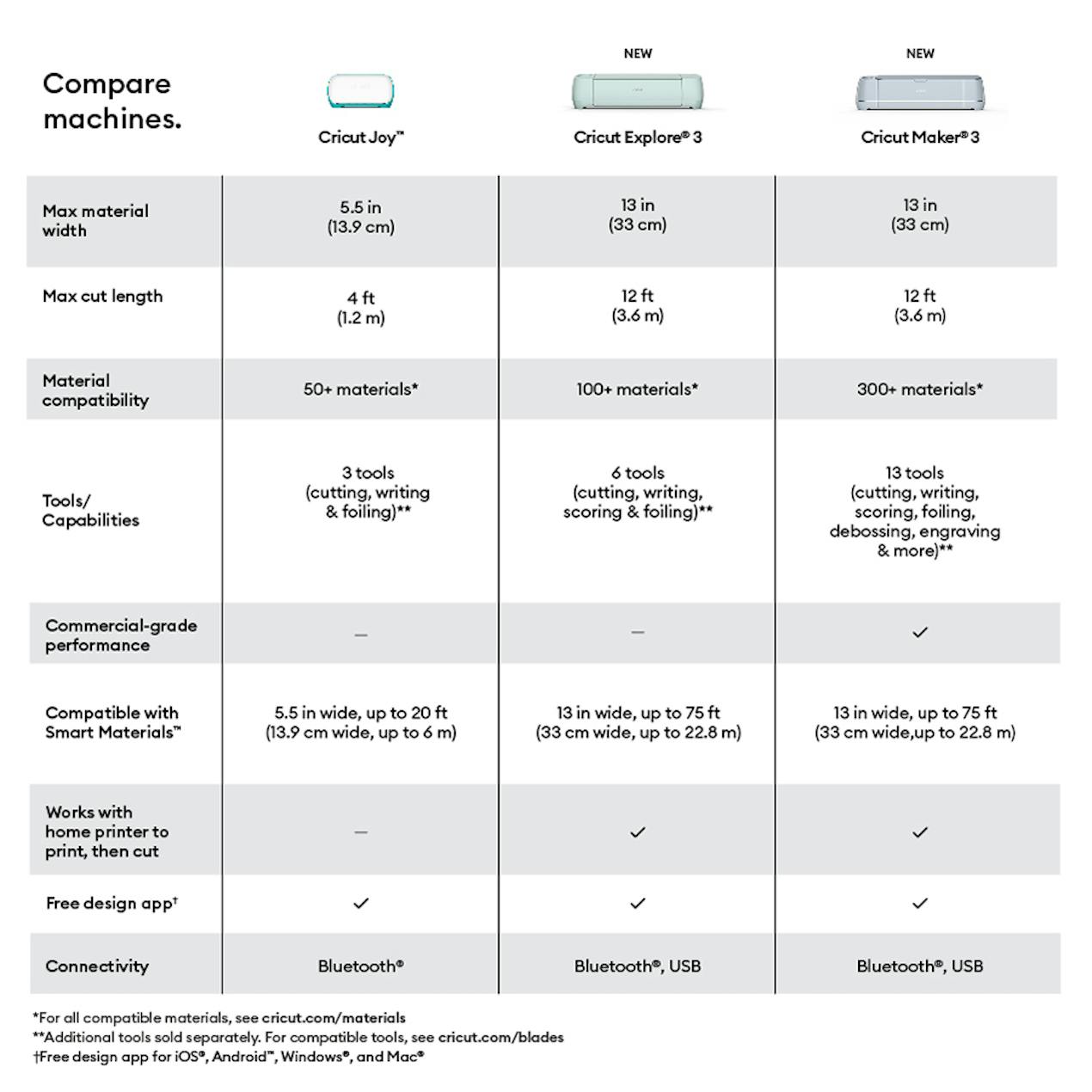
Each Cricut model comes with its own set of perks and quirks. Here, we break down each of the main three models, to help you decide which Cricut machine to buy!
Stock your stash with Cricut tools & accessories!
Go smart and cut twice as fast with Cricut Smart Materials - no mat required, simply load and go! Pressed to impress, Cricut iron-on materials are sure to leave an impression and last 50+ washes. Create cutting edge cards with the Cricut Joy and insert cards, or craft versatile vinyl designs for mugs, wall decals and stencils.
Let your imagination run wild with a wide range of innovative, high-quality materials all designed to cut perfectly with Cricut machines!



Sarah Jones is Content Manager at LoveCrafts. Lover of chunky yarns and colourful paper crafts, Sarah works with the in-house team and a whole load of talented content creators to keep makers informed and inspired!

The 10 best mohair jumpers & cardis to make this year
Mohair knits are having a moment. Here are 10 of the best mohair knitting patterns to i...
Continue reading The 10 best mohair jumpers & cardis to make this year
Delightful spring crafts to brighten your day!
All things floral and fabulous, discover spring crafts guaranteed to brighten anyone's ...
Continue reading Delightful spring crafts to brighten your day!


